

Lesaka Payouts
Lorem ipsum dolor sit amet consectetur. Semper sed sit purus imperdiet aliquet. Rhoncus consectetur rutrum non est nisi. Lectus semper amet tellus morbi diam iaculis.
Lesaka Payouts lets you
Cardholder portal setup guide
Getting started
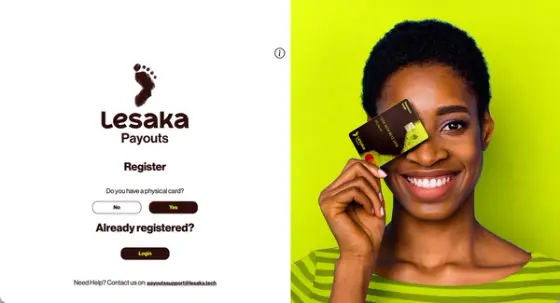
Scan the QR code or tap the button to open Cardholder portal.
If you have a physical card, select Yes.
If you have a virtual card, select No.
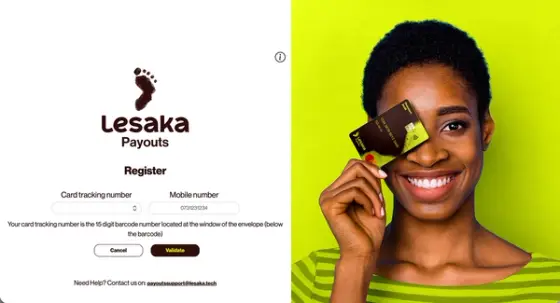
Using a physical card
Locate the 15 digits from under the barcode on the envelope your card arrived in and enter them in the card tracking space.
Insert your cell phone (mobile) number into mobile number space.
Select Validate.
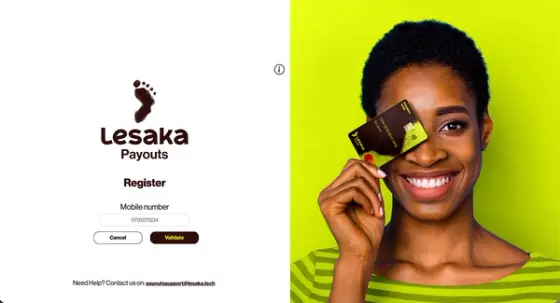
Using a virtual card
Insert your cell phone (mobile) number into Mobile number space.
Select Validate.
Activate your profile
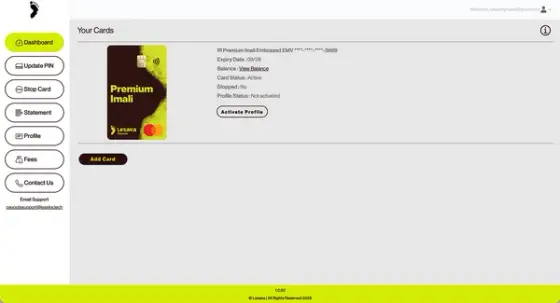
You should auto-login into your profile.
Navigate to the Dashboard page/tab.
Ensure your Card Status is Active (if not, email us at: payoutssupport@lesakatech.com).
Click Activate Your Profile so you can spend your moola!
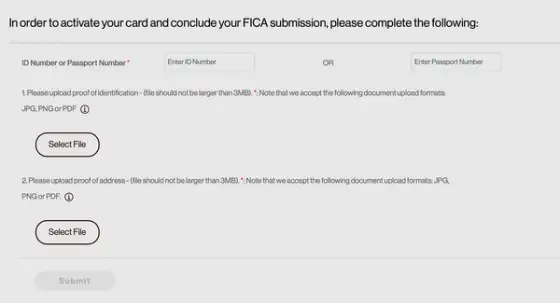
FICA Registration
Enter your ID or passport number.
Upload proof of identification.
Upload proof of residence.
Select Submit.
Looking for a secure payout solution for your business?
Trusted by over 500 corporates and backed by Mastercard, our transactional card products empower you to recognise and reward positive workplace behaviours.
Connect with Lesaka EasyPay on Facebook. Helpful tips & support when you need it.
More ways we can help
Everything you need to manage your money in one place